MACSQuantify™ Tyto® Software for cell sorting

Effortless cell sorting. Seamless compliance.

Log-in interface of MACSQuant Tyto Software 3.2

Take on even the most advanced multiparameter cell sorting experiments in research or GMP environments with the MACSQuant® Tyto Family of cell sorters, powered by MACSQuantify Tyto Software.

Built on our robust MBCore operating system, the latest MACSQuantify Tyto Software 3.2 puts automation at your fingertips, combining effortless operation with optimized performance for high-speed microfluidic cell sorting.

Experience simplicity in cell sorting

The user-friendly interface of the MACSQuantify Tyto Software enables you to quickly access frequently used functions directly from the toolbar, including the sort modes, automated calibration, and real-time sort statistics.

Sort modes

Select from four tailored sort modes designed to meet specific experimental requirements with enhanced precision and efficiency.

Get details

Sort modes

Select from four tailored sort modes designed to meet specific experimental requirements with enhanced precision and efficiency.

Get details

Laser modes

Exclusively designed for the 4-laser MACSQuant Tyto Lux Cell Sorter, this feature enables flexible optimization of your panel by easily switching the yellow laser on or off.

Get details

Laser modes

Exclusively designed for the 4-laser MACSQuant Tyto Lux Cell Sorter, this feature enables flexible optimization of your panel by easily switching the yellow laser on or off.

Get details

Real-time sort statistics

Displays live data from the current sort, including sort and abort metrics. Three dynamic graphs and two summary tables provide a clear snapshot of sorting performance.

Get details

Real-time sort statistics

Displays live data from the current sort, including sort and abort metrics. Three dynamic graphs and two summary tables provide a clear snapshot of sorting performance.

Get details

Automated calibration

Our Smart Gain Technology allows consistent sorting settings across instruments and locations, for reproducible results and seamless scalability.

Get details

Automated calibration

Our Smart Gain Technology allows consistent sorting settings across instruments and locations, for reproducible results and seamless scalability.

Get details

Progress bar

Provides real-time instrument status with a clear overview of key sort parameters, and easy access to flow control.

Progress bar

Provides real-time instrument status with a clear overview of key sort parameters, and easy access to flow control.

Image of the MACSQuant Tyto Lux Cell Sorter screen with focus on the new MACSQuantify Tyto Software 3.2.

Sort modes

Select from four tailored sort modes designed to meet specific experimental requirements with enhanced precision and efficiency.

Get details

Sort modes

Select from four tailored sort modes designed to meet specific experimental requirements with enhanced precision and efficiency.

Get details

Laser modes

Exclusively designed for the 4-laser MACSQuant Tyto Lux Cell Sorter, this feature enables flexible optimization of your panel by easily switching the yellow laser on or off.

Get details

Laser modes

Exclusively designed for the 4-laser MACSQuant Tyto Lux Cell Sorter, this feature enables flexible optimization of your panel by easily switching the yellow laser on or off.

Get details

Real-time sort statistics

Displays live data from the current sort, including sort and abort metrics. Three dynamic graphs and two summary tables provide a clear snapshot of sorting performance.

Get details

Real-time sort statistics

Displays live data from the current sort, including sort and abort metrics. Three dynamic graphs and two summary tables provide a clear snapshot of sorting performance.

Get details

Automated calibration

Our Smart Gain Technology allows consistent sorting settings across instruments and locations, for reproducible results and seamless scalability.

Get details

Automated calibration

Our Smart Gain Technology allows consistent sorting settings across instruments and locations, for reproducible results and seamless scalability.

Get details

Progress bar

Provides real-time instrument status with a clear overview of key sort parameters, and easy access to flow control.

Progress bar

Provides real-time instrument status with a clear overview of key sort parameters, and easy access to flow control.

Sort modes: Tailored precision for efficient sorting

Sort modes in the MACSQuantify Tyto Software 3.2.

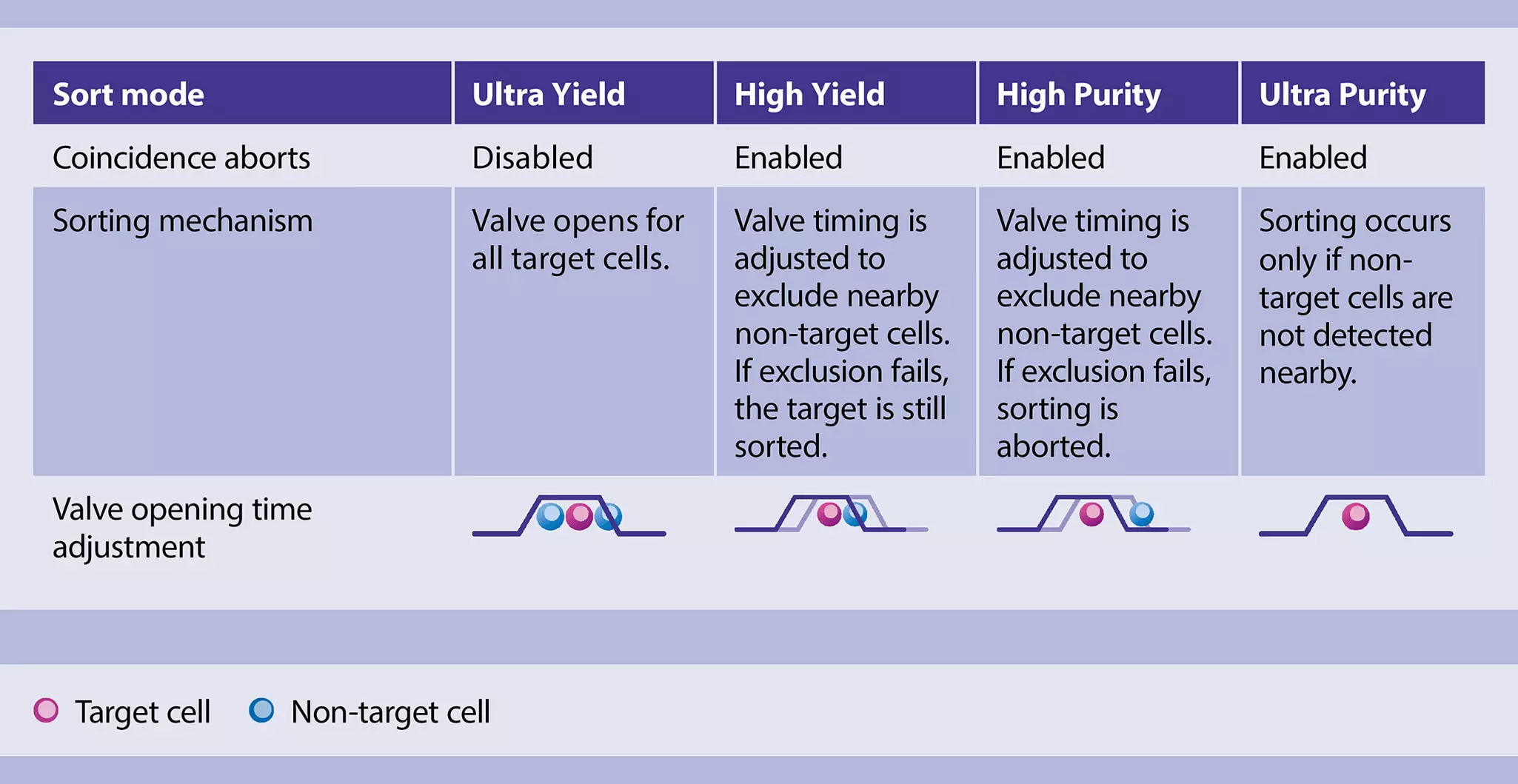
The four automated sort modes – Ultra Purity, High Purity, High Yield, and Ultra Yield – shift the balance between purity and yield to meet specific experimental goals.

Comparison of sorting mechanisms by sort mode.

Key parameters like coincidence aborts, valve timing, and sort aborts are finely tuned in each mode to deliver tailored performance and optimized results.

  • Ultra modes for targeted results: The Ultra Purity mode suits applications where high purity is critical, while the Ultra Yield mode is ideal for preenrichment steps or low-input samples.
  • High modes for flexible outcomes: The High Purity and High Yield modes provide a strategic compromise for applications that require both reliable purity and high cell recovery.
  • High-speed performance: Achieve exceptional purity at droplet sorter-level sorting speeds, while keeping all the benefits of a gentle and closed system.

Application note

Gentle cell sorting, faster than ever: Discover how the new MACSQuantify Tyto Software 3.2 breaks the speed barrier in microfluidics!

The new software introduces four automated sort modes that boost microfluidic cell sorting speed up to 28 times while maintaining exceptional purity and preserving cell viability in a closed system. Dive into the data and see how precision meets performance.

Laser modes

The laser modes are exclusively designed for the MACSQuant Tyto Lux Cell Sorter, which features four continuous wave lasers: violet (405 nm), blue (488 nm), yellow (552 nm), and red (638 nm). Because the blue and yellow lasers are collinear, their output can be easily adjusted or switched to support different excitation modes.

This flexible laser mode switching enables precise tuning to your panel design, simplifying setup and reducing the need for extensive panel optimization. Use the guide below to select the mode that best supports your application.

Laser modeLaser configurationWhen to use
BalancedBoth blue and yellow at balanced power
  • Best overall signal-to-noise ratio
  • Recommended for calibration
  • Default mode
Yellow OffBlue: full power
Yellow: off
  • Suitable when fruit dyes are not included in the panel
  • Ideal for simplified panels
Yellow OnlyBlue: minimal power
Yellow: full power
  • Optimized for panels using fruit dyes
  • Blue laser operates at minimal power for scatter detection

Automated calibration

The MACSQuantify Tyto Software version 3.1 or higher provides Smart Gain technology, which automatically adjusts PMT voltages to predefined target values during daily calibration using the MACSQuant Tyto Calibration Beads. This automated process ensures consistent performance and simplifies instrument setup.

  • Streamlined workflow: Eliminate manual gain adjustments and simplify setup in longitudinal studies.
  • Standardization: Harmonize instrument sensitivity intra‑ and inter‑device.
  • High data reproducibility: Achieve consistent results across experiments, users, and instruments.

Video

Learn how to perform automatic calibration in the MACSQuantify Tyto Software.

Watch the video to follow the software workflow step by step.

Real-time sort statistics

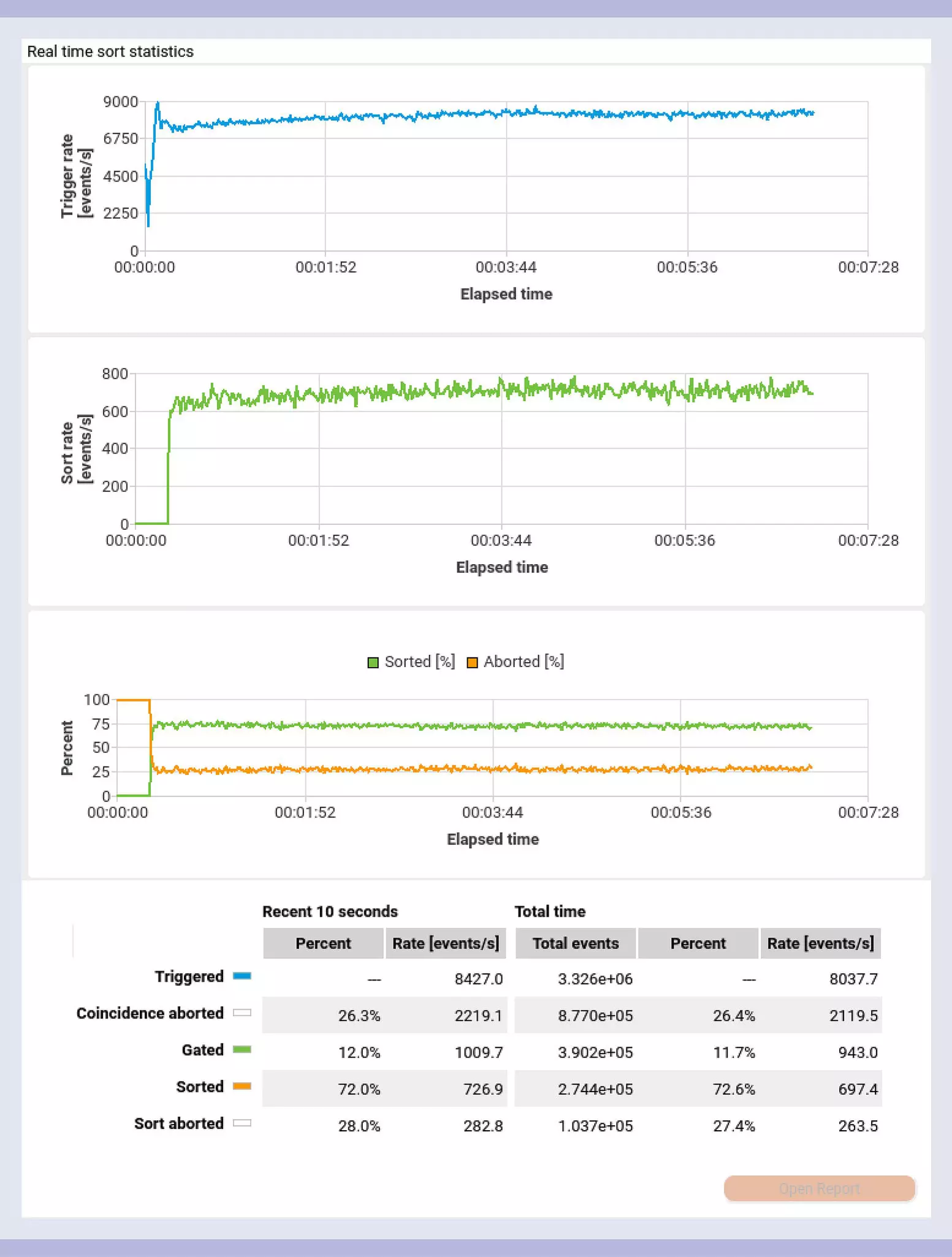
Real-time sort statistics in the MACSQuantify Tyto Software 3.2.

The real-time sort statistics window displays live data from the current sort and statistics for the sort rate, sort count, abort rate, and abort count, over time and in total. With the introduction of sort modes in MACSQuantify Tyto Software 3.2, coincidence aborts were added to the statistics, calculated directly from the triggered events.

  • Live sort monitoring: Track sorting performance in real time and make informed decisions on the spot to ensure optimal results.

Tap, sort, done: Intuitive touchscreen interface

The additional touchscreen provides convenient operation and real-time monitoring of the microchip with a live camera view.

Automated compensation

Automated compensation for multicolor analysis using single-stained cells or our dedicated beads.

Get details

Automated compensation

Automated compensation for multicolor analysis using single-stained cells or our dedicated beads.

Get details

Automated cartridge priming

The automated priming function prewets the collection chambers to remove air and improve sample flow. All events sorted during this process are included in the final sort statistics.

Get details

Screenshot from MACSQuantify Tyto Software 3.2 on the MACSQuant Tyto Lux Cell Sorter showing the automated priming feature.

Automated cartridge priming

The automated priming function prewets the collection chambers to remove air and improve sample flow. All events sorted during this process are included in the final sort statistics.

Get details

Live camera view

The cartridge tab on the touchscreen displays a live camera view of the sorting mechanism.

Screenshot from the MACSQuantify Tyto Software 3.2 on the MACSQuant Tyto Lux Cell Sorter showing the camera view function on the touchscreen.

Live camera view

The cartridge tab on the touchscreen displays a live camera view of the sorting mechanism.

Automated cartridge alignment

The system automatically calculates cartridge alignment coordinates. Proper alignment is confirmed when the yellow crosshair is centered on the fiducial mark and is continuously maintained throughout the sort.

Automated cartridge alignment

The system automatically calculates cartridge alignment coordinates. Proper alignment is confirmed when the yellow crosshair is centered on the fiducial mark and is continuously maintained throughout the sort.

Image of the MACSQuant Tyto Lux Cell Sorter focusing on the touchscreen features with the MACSQuantify Tyto Software 3.2.

Automated compensation

Automated compensation for multicolor analysis using single-stained cells or our dedicated beads.

Get details

Automated compensation

Automated compensation for multicolor analysis using single-stained cells or our dedicated beads.

Get details

Automated cartridge priming

The automated priming function prewets the collection chambers to remove air and improve sample flow. All events sorted during this process are included in the final sort statistics.

Get details

Screenshot from MACSQuantify Tyto Software 3.2 on the MACSQuant Tyto Lux Cell Sorter showing the automated priming feature.

Automated cartridge priming

The automated priming function prewets the collection chambers to remove air and improve sample flow. All events sorted during this process are included in the final sort statistics.

Get details

Live camera view

The cartridge tab on the touchscreen displays a live camera view of the sorting mechanism.

Screenshot from the MACSQuantify Tyto Software 3.2 on the MACSQuant Tyto Lux Cell Sorter showing the camera view function on the touchscreen.

Live camera view

The cartridge tab on the touchscreen displays a live camera view of the sorting mechanism.

Automated cartridge alignment

The system automatically calculates cartridge alignment coordinates. Proper alignment is confirmed when the yellow crosshair is centered on the fiducial mark and is continuously maintained throughout the sort.

Automated cartridge alignment

The system automatically calculates cartridge alignment coordinates. Proper alignment is confirmed when the yellow crosshair is centered on the fiducial mark and is continuously maintained throughout the sort.

Automated compensation

Accurate compensation of spectral overlap is essential for reliable multicolor flow cytometry analysis. The MACSQuantify Tyto Software automates this process using single-stained cells or our dedicated MACS Compensation Beads.

Video

Learn how to perform automatic compensation in the MACSQuantify Tyto Software.

Watch the video to follow the software workflow step by step.

Automated cartridge priming

Screenshot from MACSQuantify Tyto Software 3.2 on the MACSQuant Tyto Lux Cell Sorter showing the automated priming feature.
Automated cartridge priming button on the touchscreen.

Priming of the MACSQuant Tyto Cartridge is an essential step that effectively removes air bubbles and establishes the necessary fluidic conditions for accurate and efficient cell sorting. This pre-sort process is now fully automated on the instrument.

  • Built-in efficiency: Cartridge priming is integrated into the sort setup, minimizing manual handling, streamlining your workflow, and reducing the risk of error.
  • Quick start: No need to prime with buffer first. Simply load your sample and start sorting.

Easy integration in GMP processes: 21 CFR Part 11 module

Clinical employee in clean room attire starting a cell sorting process on the MACSQuant Tyto Cell Sorter

The 21 CFR Part 11 software module for compliance with FDA regulations on electronic records and signatures can be enabled by purchasing a 21 CFR Part 11 license.This software module includes:

  • Time-stamped audit trails
  • Fully configurable user management system
  • Run reports with electronic signature
  • Customizable lock-screen functionality
  • Optional: Connection to existing LDAP system

Experience a seamless transition of your cell sorting applications to GMP-compliant environments.

Jumpstart your GMP-compliant cell sorting with the MACSQuant Tyto Family!

Designed for seamless integration into regulated environments, the MACSQuant Tyto Family streamlines GMP-compliant cell sorting with unmatched safety and precision.

Watch the video to learn more!

All MACSQuant Tyto Products

13 products found

|